Musical Lights
In this project, we are going to create RGB light flashing in sync with a tune played on the speaker. We will build this project on top of Musical Tunes project. Please refer to that project before you proceed.
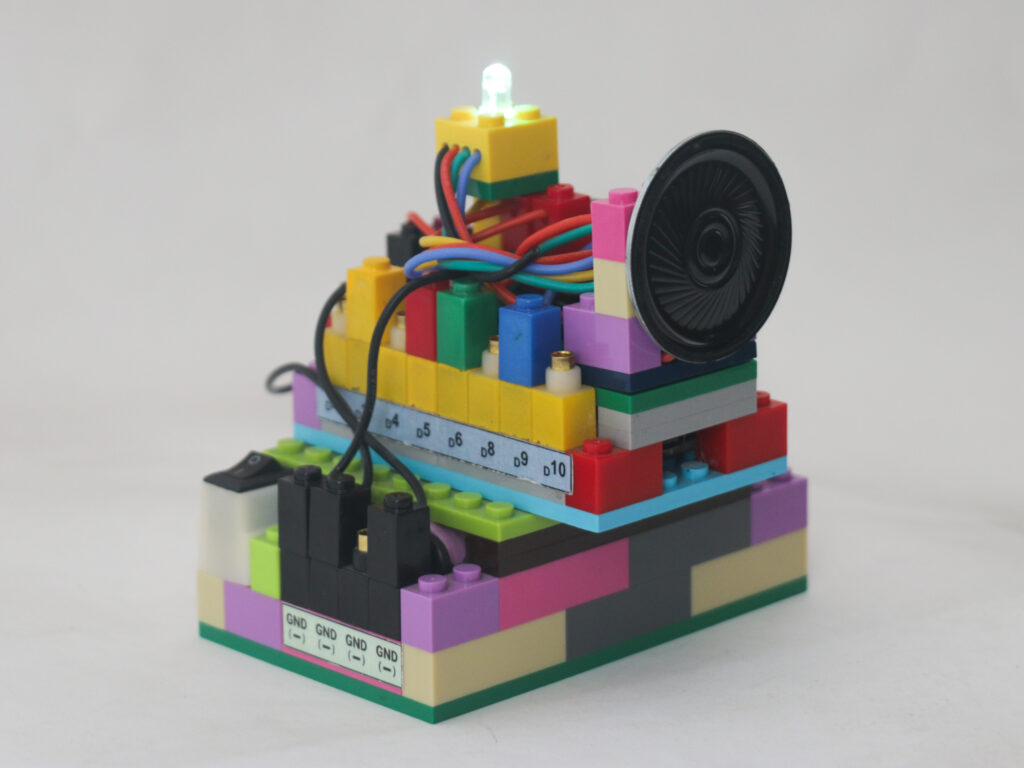
We will use RGB LED and generate variety of colors with each beat of the tune.
Components
Connections
The connections are similar to the Musical Tunes project where we attach pin D3 to the transistor base pin, 5v to the transistor collector pin and transistor emitter pin to speaker red pin. Connect the speaker black pin to ground.
Connect the RGB LED red pin to pin D5, green pin to D6 and blue pin to D9. It is important to connect these to PWM enabled pins which are pins D3, D5, D6, D9, D10 & D11. Connect RGB LED black pin to ground.
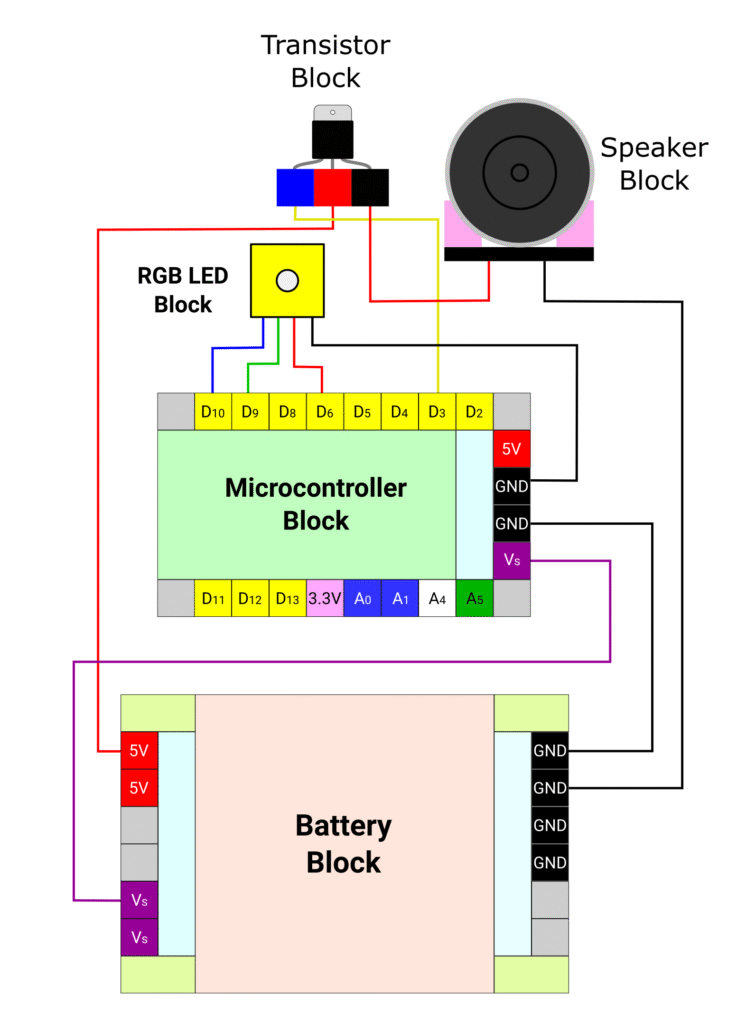
Connect the Connect the microcontroller pin D3 to the blue pin of the transistor. Connect the red pin of the transistor block to the +5V pin of the battery block.
Code
We will use pitches.h library which we have created before in the Musical Tunes project. If you have not done the library, follow the instructions in that project to create it.
The melody and duration arrays are not affected at all so use them exactly as musical tunes project.
We will declare the red, green & blue pins as D5, D6 & D9 respectively. In the setup section, we will declare all these pins along with speaker pin as outputs.
We will use random function which can generate random number between given two numbers. Since we need to provide the value between 0 and 255 to each red, green & blue pin, we will use random function to generate the value.
We will also create a function setcolor to provide analog output to the RGB pins.
When there is no note, we will set the RGB pin value 0 so that whenever there is a break, the light also blinks.
/*
   Makernova Robotics 2025
   In this program we use microcontroller to create musical notes and RGB LED
   to create lights
*/

// The notes information could be added here directly instead of creating a library

//predefined notes and corresponding frequencies
#include<pitches.h> // comment it if you are copying the notes information directly

const int speakerPin= 3;
const int redPin = 6;       // make sure to select pins which are PWM enabled
const int greenPin = 9;
const int bluePin = 10;

//Change to 0.5 for a slower version of the song, 1.25 for a faster version
const float songSpeed = 1.0;

// notes in the melody:
// for different tunes, copy/paste notes in this array
int melody[] = {
  NOTE_AS4, REST, NOTE_AS4, REST, NOTE_AS4, REST, NOTE_AS4, REST,
  NOTE_AS4, NOTE_B4, NOTE_DS5,
  NOTE_AS4, REST, NOTE_AS4, REST,
  NOTE_AS4, NOTE_B4, NOTE_DS5,
  NOTE_AS4, REST, NOTE_AS4, REST,
  NOTE_AS4, NOTE_B4, NOTE_DS5,
  NOTE_AS4, REST, NOTE_AS4, REST,
  NOTE_AS4, NOTE_B4, NOTE_DS5,
  NOTE_F5, REST, NOTE_F5, REST,
  NOTE_GS5, NOTE_FS5, NOTE_F5,
  NOTE_AS4, REST, NOTE_AS4, REST,
  NOTE_GS5, NOTE_FS5, NOTE_F5,
  NOTE_AS4, REST, NOTE_AS4, REST,
  NOTE_AS4, NOTE_B4, NOTE_DS5,
  NOTE_AS4, REST, NOTE_AS4, REST,
  NOTE_AS4, NOTE_B4, NOTE_DS5,
  NOTE_AS4, REST, NOTE_AS4, REST,
  REST
};

// Durations of each music note of the song
// 1 is full note, 2 is half note, 4 is quarter note etc. is when songSpeed = 1.0
int durations[] = {
  4, 4, 4, 4, 4, 4, 4, 4,
  3, 3, 4,
  4, 4, 4, 4,
  3, 3, 4,
  4, 4, 4, 4,
  3, 3, 4,
  4, 4, 4, 4,
  3, 3, 4,
  4, 4, 4, 4,
  3, 3, 4,
  4, 4, 4, 4,
  3, 3, 4,
  4, 4, 4, 4,
  3, 3, 4,
  4, 4, 4, 4,
  3, 3, 4,
  4, 4, 4, 4,
  1
};

void setup() {
  pinMode(speakerPin, OUTPUT);
  pinMode(redPin, OUTPUT);
  pinMode(greenPin, OUTPUT);
  pinMode(bluePin, OUTPUT);
}

void loop() {
  //count the number of notes in the melody
  const int size = sizeof(durations) / sizeof(int);

  // iterate over the notes of the melody:
  for (int note = 0; note < size; note++) {

      const int currentNote = melody[note];

     //to calculate the note duration, take one second divided by the duration divided by speed
     //e.g. for speed 1, quarter note = 1000 / 4, eighth note = 1000/8, etc.
     float duration = (1000 / durations[note]) / songSpeed;

    if (currentNote != 0) {
      tone(speakerPin, melody[note], duration);
      int i = random(0, 255);      // random function generates random number
      int j = random(0, 255);
      int k = random(0, 255);
      setColor(i, j, k);
    } else {
      noTone(speakerPin);
      setColor(0, 0, 0);
    }
    // delay is used to wait for tone to finish playing before moving to next loop
    delay(duration);

  }
}

//custom function to set color on RGB LED
void setColor(int red, int green, int blue) {
  analogWrite(redPin, red);
  analogWrite(greenPin, green);
  analogWrite(bluePin, blue);
}
Like mentioned in the Musical Tunes project, different melodies can be created by changing only the melody and the duration arrays. There are many creators who have created variety of melodies. You can visit the link to see those. Just copy and paste required melody and durations array in the program to play that melody.